

What Is Automated Customer Service?
Automated customer service uses technology to handle customer enquiries without relying on a live agent for every interaction. It can answer common questions, check account details, provide order updates, collect feedback, and much more.
It works best for high-volume, repetitive tasks where the answer comes from information your business already has. More complex or sensitive issues, on the other hand, should always be passed to a human agent.
Rule-Based Automation vs AI Chatbots vs AI Agents
Not all “bots” are the same. Customer service automation has evolved significantly, and understanding the difference can help you choose the right solution.
Rule-Based Automation
These systems follow predefined rules and keywords. They’re great for simple tasks like sharing business hours, answering FAQs, checking order status, or guiding customers through menu options. But if a customer asks something unexpected, they quickly reach their limits.
AI Chatbots
AI chatbots understand natural language, so customers don’t have to use exact keywords. They’re ideal for answering FAQs, qualifying leads, collecting information, and handling first-line support. However, they mostly provide information – they don’t actually complete tasks.
AI Agents
This is where things get interesting. AI agents don’t just answer questions – they take action. They can verify customers, access business systems, process requests, update records, send notifications, and complete entire workflows without human intervention.
The key is knowing when to hand over to a person. Complex situations that require empathy, negotiation, or human judgment should always be escalated to a live agent.
How Does Automated Customer Service Work?
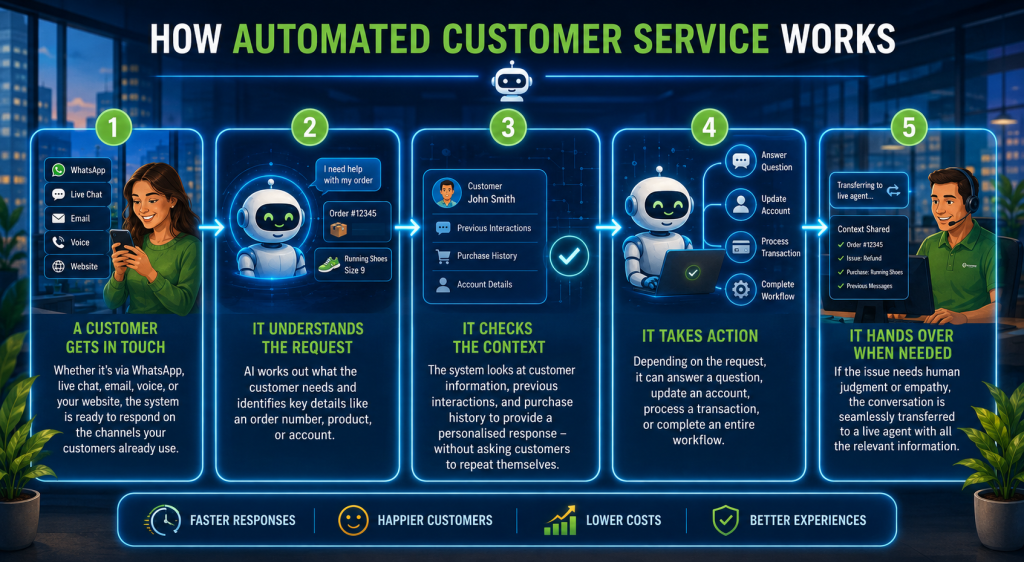
Most automated customer service follows the same simple process:
1. A customer gets in touch
Whether it’s via WhatsApp, live chat, email, voice, or your website, the system is ready to respond on the channels your customers already use.
2. It understands the request
AI works out what the customer needs and identifies key details like an order number, product, or account.
3. It checks the context
The system looks at customer information, previous interactions, and purchase history to provide a personalised response – without asking customers to repeat themselves.
4. It takes action
Depending on the request, it can answer a question, update an account, process a transaction, or complete an entire workflow.
5. It hands over when needed
If the issue needs human judgment or empathy, the conversation is seamlessly transferred to a live agent with all the relevant information.
The more customers interact with the system, the smarter it becomes. By analysing conversations, businesses can identify gaps, improve responses, and continuously deliver a better customer experience.
What Are the Benefits of Automated Customer Service?
Automating customer service isn’t about replacing people – it’s about letting your team focus on the conversations that matter most. Here are some of the biggest benefits:
1. 24/7 Customer Support
Customers can get help anytime, whether it’s checking an order, resetting a password, or changing a booking – even outside business hours.
2. Lower Support Costs
By automating repetitive enquiries, your support team spends less time answering the same questions over and over, reducing operational costs.
3. Faster Response Times
Automation can find information, update records, and respond in seconds, giving customers the quick service they expect.
4. Happier Customers
Fast, accurate, and consistent responses lead to better customer experiences. With access to customer data, automated systems can also deliver more personalised support.
5. More Productive Support Teams
Instead of handling repetitive requests, agents can focus on complex issues where empathy and problem-solving make the biggest difference.
6. Easy to Scale
Whether you receive 100 enquiries or 10,000, automation can handle spikes in demand without needing to rapidly grow your support team.
7. Support Across Every Channel
From WhatsApp and live chat to email and social media, customers get the same seamless experience – without having to repeat themselves every time they switch channels.
When implemented well, automated customer service improves the experience for both customers and support teams, helping businesses deliver faster, smarter service at scale.
Automated Customer Service Examples
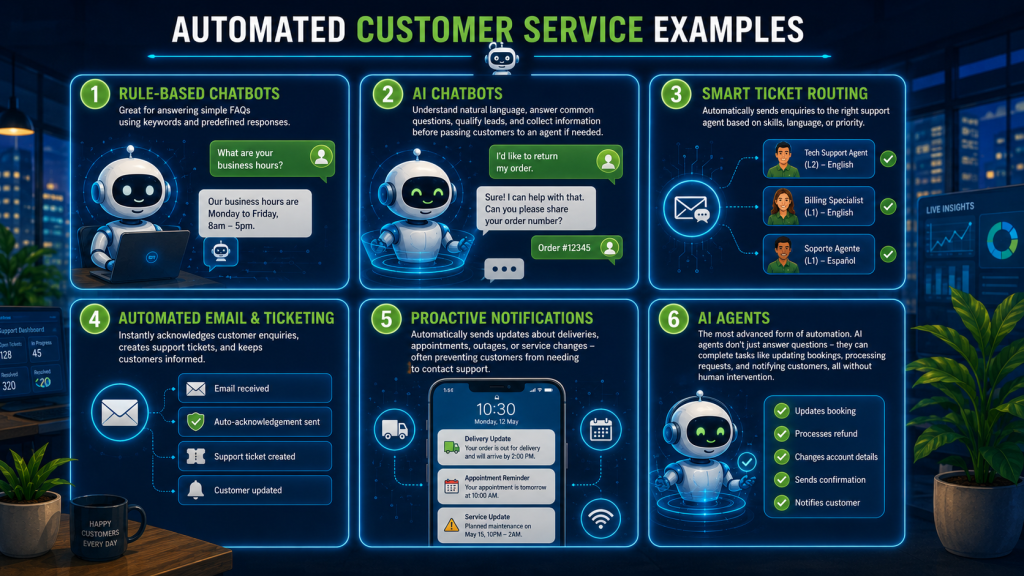
Customer service automation comes in many forms – from simple tools to advanced AI agents. Here are some of the most common examples:
- Rule-Based Chatbots – Great for answering simple FAQs using keywords and predefined responses.
- AI Chatbots – Understand natural language, answer common questions, qualify leads, and collect information before passing customers to an agent if needed.
- Smart Ticket Routing – Automatically sends enquiries to the right support agent based on skills, language, or priority.
- Automated Email & Ticketing – Instantly acknowledges customer enquiries, creates support tickets, and keeps customers informed.
- Proactive Notifications – Automatically sends updates about deliveries, appointments, outages, or service changes – often preventing customers from needing to contact support.
- AI Agents – The most advanced form of automation. AI agents don’t just answer questions – they can complete tasks like updating bookings, processing requests, and notifying customers, all without human intervention.
The best customer service strategies often combine several of these tools, creating a faster, smoother experience for both customers and support teams.
Customer Service Automation Use Cases
Here are a few real-world ways businesses are using automation to deliver faster, better customer service.
Generate More Leads
An AI chatbot on WhatsApp or your website can answer questions 24/7, qualify leads, and capture customer details before handing them to your sales team. Every conversation comes with valuable context, making follow-ups much more effective.
Deliver Better Customer Support
Bring all your support channels into one platform so your chatbot, agents, and customer data work together. Simple enquiries are handled automatically, while more complex issues are passed to an agent with the full conversation history.
Give Customers Instant Account Information
Instead of waiting for an agent, customers can securely check account balances, order status, or policy information whenever they need it. It’s faster for customers and frees up your support team.
Automate Bookings and Appointments
Let customers book, change, or cancel appointments through chat. The system updates your calendar automatically and sends confirmations and reminders, reducing admin and missed appointments.
Help Customers Faster
Whether someone is reporting lost property, tracking a parcel, or logging a service issue, automation can collect the right information and route them to the right team immediately – reducing wait times and making support far more efficient.
The best customer service automation doesn’t replace people. It takes care of the repetitive tasks so your team can focus on the conversations where they add the most value.
How to Automate Customer Service in 6 Steps
Getting started with customer service automation doesn’t have to be complicated. Follow these six steps:
1. Map the customer journey
Understand how your customers contact you, where they get stuck, and which channels they prefer.
2. Start with simple, repetitive tasks
Automate common requests like order tracking, account lookups, FAQs, or appointment bookings. These deliver the quickest wins.
3. Know when to involve a person
Not every enquiry should be automated. Complaints, sensitive issues, and complex cases should always be routed to a live agent.
4. Choose the right platform
Look for a solution that connects your chatbot, customer data, contact centre, and communication channels. The more connected your systems are, the better the customer experience.
5. Test before you launch
Put yourself in your customer’s shoes. Test every conversation, make sure responses are accurate, and confirm it’s easy to reach a live agent when needed.
6. Measure and improve
Monitor performance, review customer conversations, and refine your automated workflows over time. Start small, learn what works, and gradually automate more processes. The goal isn’t to automate everything – it’s to automate the right things. The best customer service combines fast, intelligent automation with a seamless handover to a human whenever it’s needed.
Making Automated Customer Service Work for Your Business
Automated customer service isn’t just about chatbots. It’s a combination of technologies working together. When done right, it creates faster, smoother support that customers appreciate – rather than a frustrating experience that leaves them looking for a way to speak to a person.
The goal isn’t to replace your support team – it’s to take repetitive work off their plate so they can focus on the conversations that need a human touch.